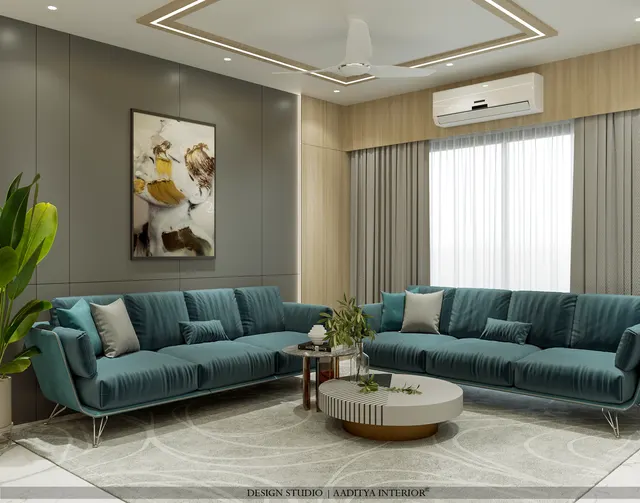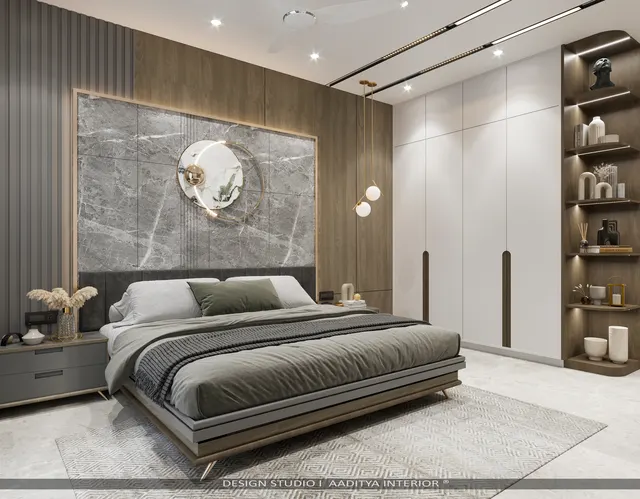


A modern Indian living room can have six kinds of light in its ceiling alone: a cove strip, a row of downlights, a pair of wall washers, a profile light, a chandelier over the dining table and spots on the art. Each has its own switch, and a typical switchboard beside the sofa ends up with eight or ten identical rockers that nobody can name. The result is predictable. The family switches on the same two lights every evening, the cove and the wall washers that cost so much are used at parties only, and the room never looks the way it did in the 3D render.
Smart lighting promises to fix this with one touch: a Dinner scene, a Movie scene, a Night scene. Done well, it does. Done badly — and it is often done badly — it adds flicker, buzzing drivers, lights that do not respond when the internet is down, an app that only one family member understands, and a switchboard that looks futuristic but still does not tell anyone which button does what. The difference is almost never the brand. It is whether the lighting was planned as circuits and scenes before the wiring was laid.
This article explains how lighting scenes work, how the circuits behind them must be planned, which control technologies suit Indian homes, how to avoid the classic compatibility mistakes between dimmers and LED drivers, and what each approach costs. It builds on the lighting-plan, lux-level and colour-temperature guides elsewhere on this site and keeps their numbers.
From the dimmer to the scene: a short history
Controlling the brightness of electric light is almost as old as electric light. Theatres used large resistance and later transformer dimmers to fade stage lighting long before homes could. The change that brought dimming into houses was the solid-state dimmer, using thyristor and later triac electronics from around the 1960s, which was small enough to fit into a wall box and cheap enough to sell to homeowners. For decades, home dimming meant one knob controlling one incandescent circuit.
Two developments followed in parallel. In homes, the mid-1970s saw the first widely sold home-automation protocol, X10, which sent simple on, off and dim commands over the mains wiring. In commercial buildings, centralised lighting control grew into dedicated digital systems: KNX, a building-automation bus standardised as ISO/IEC 14543-3, and DALI, the Digital Addressable Lighting Interface standardised as IEC 62386, which lets every driver be addressed and dimmed individually. Hotels, offices and high-end villas used these systems to programme scenes — fixed combinations of light levels recalled with one button.
The arrival of LED lighting and cheap wireless chips in the 2010s brought scenes to ordinary homes through Wi-Fi bulbs, Zigbee switches and smartphone apps. The fragmentation that followed — every brand with its own app and hub — led the industry to Matter, an interoperability standard released in 2022 by the Connectivity Standards Alliance, which aims to let devices from different brands work together and to keep control local where possible. The technology keeps changing; the design principle has not. A scene is only as good as the circuits behind it.
Scenes are built from circuits
A lighting scene is a stored set of levels — this circuit at 70 per cent, that one at 20, a third off — recalled with one button, a voice command, a schedule or a sensor. The key word is circuit. A scene can only control what has been wired separately. If the cove and the downlights are on one switch, no app can dim one without the other. So the first and most important step in smart lighting happens on the electrical drawing: every lighting layer that should behave differently gets its own circuit, back to a switch box where a smart switch, a dimmer or a control module can reach it.
In practice, a living–dining space usually needs five to seven circuits: ambient light (cove or indirect), general downlights, wall washers or accent spots, the dining pendant, a decorative feature such as a backlit panel or profile light, and sometimes a separate circuit for the TV-wall backlight or a reading lamp socket. Bedrooms need three or four; kitchens three; bathrooms two. Fig. 1 shows the circuits for a typical 6000 × 3600 mm living area with a 3000 × 3600 mm dining area beside it.
How many scenes, and which ones
The most common mistake after poor circuiting is too many scenes. Families remember four or five; a keypad with twelve buttons becomes as confusing as the old switchboard. A good set for a living–dining space is Welcome or Day (general light), Evening (warm and layered), Dinner (focus on the table), Movie (very low, no reflections on the screen), and All Off or Night. Each is a stored mix of the circuits, at a colour temperature that matches the time of day. Warm white of about 2700–3000 K suits evening living and dining; neutral white of 3500–4000 K suits daytime tasks, kitchens and studies, as the colour-temperature guide on this site explains.
| Scene | When | Circuit levels (C1–C6) | Colour temperature | Notes |
|---|---|---|---|---|
| Day / Clean | Daytime, cleaning, guests arriving | Cove 80 %, downlights 90 %, washers 50 %, pendants 50 % | 3500–4000 K | Highest overall light; general tasks |
| Evening | Family time after sunset | Cove 70 %, downlights 20 %, washers 60 %, pendants 40 %, art 50 % | 2700–3000 K | Layered and warm; walls lit, ceiling soft |
| Dinner | Meals at the table | Pendants 75 %, cove 30 %, washers 20 %, art 40 % | 2700 K | Light pooled on the table, room dimmed |
| Movie | TV or projection | Cove 15 %, TV backlight 30 %, all else off | 2700 K | No light falling on the screen |
| Night / Path | Late night, all asleep | Cove 5 % or a sensor-triggered toe-kick | 2200–2700 K | Just enough to walk safely |
| All off / Away | Leaving home | Everything off; optional random evening schedule | — | One button by the main door |
Control technologies compared
There are five broad ways to control lighting in an Indian home today, and they can be mixed. The choice depends on whether the home is being wired from scratch or retrofitted, how many circuits there are, how much the family wants to depend on the internet, and budget. The table compares them on the points that matter in practice.
| System | How it works | Rewiring needed | Works without internet | Best for | Indicative cost (October 2026) |
|---|---|---|---|---|---|
| Smart bulbs and plugs (Wi-Fi or Bluetooth) | Control is inside the lamp or plug | None | Often limited; app or cloud dependent | Rentals, table lamps, one or two rooms | ₹500–1,500 per bulb |
| Retrofit modules behind existing switches | Relay or dimmer module in the back box | Neutral at the box; space in the box | Depends on brand; local control preferred | Existing flats with conventional wiring | ₹1,500–4,500 per module (1–4 channels) |
| Smart touch or keypad switch panels (Wi-Fi or Zigbee) | Replaces the switch plate; scenes on buttons | Neutral at the box; matched plate size | Usually yes, for the panel itself | New interiors, renovations | ₹4,000–15,000 per panel |
| Matter / Thread or Zigbee ecosystems | Mesh network through a hub or border router | As above; hub needed | Yes, if the hub runs scenes locally | Mixing brands, future-proofing | ₹3,000–15,000 for a hub |
| Wired DALI or KNX | Every driver or channel addressed on a control bus | Dedicated bus cable to every point | Yes — fully local | Villas, penthouses, many circuits | ₹5–15 lakh+ for a large home |
For most Indian apartments, smart switch panels or retrofit modules on a local mesh network such as Zigbee or Thread offer the best balance: scenes on physical buttons that anyone can use, an app and voice control for those who want them, and lights that still work when the Wi-Fi does not. Wired DALI or KNX is worth its cost when a home has dozens of circuits, many dimmable decorative fittings, motorised curtains and climate control to coordinate, and a long design life. Smart bulbs remain useful for lamps and for rented homes where the walls cannot be touched.
Wiring and drivers: where smart lighting usually fails
Most smart lighting problems in Indian homes are wiring problems. A conventional switch only interrupts the live wire; it needs no neutral. A smart switch or module is a small electronic device that must stay powered even when the light is off, and most models therefore need a neutral wire in the switch box. Older Indian switchboards frequently have no neutral, and even in new interiors the electrician may not bring one unless the drawing asks for it. The second problem is space: smart modules are larger than mechanical switches, so the back box must be deep enough to hold the module, the wires and the connectors without crushing them.
Dimming LEDs: match the driver to the dimmer
An incandescent lamp dims with almost any dimmer. An LED does not. Every LED fitting has a driver — inside the lamp for a retrofit bulb, or as a separate box for downlights, panels and strips — and it is the driver, not the LED, that has to accept the dimming signal. If a phase-cut wall dimmer is connected to a non-dimmable driver, the light flickers, buzzes, drops out at low levels or fails early. If a DALI controller is wired to a phase-cut driver, nothing dims at all. Mixing drivers from different makers on one dimmed circuit causes uneven levels. The fix is simple but has to be done at the specification stage: decide the dimming method for each circuit, and buy fittings with drivers that support it.
| Load | Dimming method that works | What to specify | Common problem if ignored |
|---|---|---|---|
| LED retrofit bulbs | Phase-cut (trailing edge preferred) or smart bulb | Lamps marked dimmable, a dimmer rated for LED loads | Flicker, buzz, poor low-end dimming |
| LED downlights and panels | Phase-cut, 0–10 V or DALI, per the driver | Dimmable driver of the same type on the whole circuit | Some lights glow when off; uneven levels |
| 12 V / 24 V LED strip (cove, profile) | PWM controller, or DALI / 0–10 V constant-voltage driver | Controller and power supply sized with 20 % headroom | Stepping, visible flicker on camera |
| Tunable-white or RGB strips | Multi-channel controller (Zigbee, DALI DT8 or Wi-Fi) | One controller per run; matching strip channels | Colour mismatch between runs |
| Decorative pendants and chandeliers | As per the lamps used | Check every lamp is dimmable | One non-dimmable lamp spoils the circuit |
| Ceiling fans | Fan regulator or smart fan module — never a light dimmer | Fan-rated module | Hum, overheating, motor damage |
Strip lighting deserves special care because it is the backbone of most scenes. A cove strip at ₹150–300 per running foot installed, as quoted in the lighting guides on this site, needs a power supply or driver sized for its full length with a margin, and a controller that dims it smoothly down to low levels. Long runs should be fed from more than one point to avoid voltage drop, which shows as a dimmer, warmer far end. These details are invisible on a 3D render and obvious on the first evening.
Sensors, schedules and the night path
Scenes are not only for buttons. Occupancy sensors switch on light where a person enters and off after they leave; vacancy sensors only switch off, leaving the decision to switch on to the person, which suits living rooms and bedrooms better. In Indian homes the most valued sensor applications are utilitarian: a passage, a utility area, a wardrobe interior, a toilet at night, a shoe cabinet near the main door. Schedules — a porch light at sunset, a random pattern of lights while the family is away — add security at no extra hardware cost.
The night path is the best example of a scene that improves daily life. A sensor near the bed or in the passage triggers a very low, warm light — a toe-kick strip under the bed or along the skirting, at a few per cent, at about 2200–2700 K — that leads to the toilet without waking anyone or ruining night vision. Fig. 4 shows the dimensions.
Planning smart lighting step by step
Smart lighting has to enter the project at the same moment as the electrical drawing, which in a typical interior job is in the first two or three weeks — long before the ceiling is framed or the walls are painted. The sequence that avoids rework starts with the lighting plan: the designer marks every fitting, groups them into circuits, and writes the intended scenes beside each room. The electrical consultant or contractor then converts this into a wiring layout that shows each circuit as a separate home run back to its switch box, the position of every driver and power supply (with access for replacement through a removable ceiling panel or a cove opening), a neutral at every lighting switch box, and the keypad positions.
The control system is chosen next, because it decides the drivers. If the home will use phase-cut dimming on smart panels, the fittings must carry phase-cut dimmable drivers; if it will use DALI, every driver must be DALI. Only then are the fittings ordered. On site, the supervisor checks during the conduit stage that the separate circuits and neutrals have actually been laid, and after the false ceiling that drivers are reachable. The last step is commissioning: with the furniture and curtains in place, the scenes are set at night with the family present, levels are adjusted to the real finishes, the keypads are engraved or labelled, and a one-page scene sheet goes into the handover file. Skipping any one of these steps is how a costly system ends up used as an expensive on-off switch.
What smart lighting costs
Costs depend far more on the number of circuits and the control system than on the number of lights. The ranges below are indicative October 2026 figures for supply and installation in Indian metro and tier-2 cities, excluding the light fittings themselves, which are priced as in the other lighting guides on this site — panel lights at about ₹400–1,200 each, cove strip at ₹150–300 per running foot, designer pendants at ₹2,000–15,000 each.
| Scope | Typical content | Indicative cost (October 2026) |
|---|---|---|
| One room with smart bulbs | 4–6 smart bulbs, app and voice | ₹3,000–9,000 |
| Living–dining, retrofit modules | 5–7 circuits on modules behind existing switches, dimmable drivers where needed | ₹20,000–45,000 |
| Living–dining, smart keypad panels | 2 scene keypads plus dimmer channels for 6 circuits, hub | ₹35,000–80,000 |
| Whole 3BHK, Zigbee or Wi-Fi panels | 25–40 circuits, keypads in every room, sensors in passage and utility | ₹80,000–2.5 lakh |
| Dimmable driver upgrades | Per downlight or panel, over non-dimmable | ₹300–1,200 extra each |
| Occupancy or vacancy sensor | Per sensor, installed | ₹1,000–4,000 |
| Villa or penthouse, wired DALI or KNX | 60+ circuits, scene keypads, curtains and climate integration, programming | ₹5–15 lakh or more |
Two costs are often missed. Programming and commissioning — setting the scene levels on site, labelling keypads, training the family — takes time and should be in the quotation. And the electrical drawing must be revised to show circuits, neutrals, driver positions and keypad locations before conduits go in; adding a neutral or a circuit after the walls are plastered means chasing, patching and repainting.
Where home lighting control is heading
Three directions are clear. Interoperability is improving: Matter and Thread aim to let devices from different makers share one network and one app, with control running locally rather than through distant servers. Light is becoming tunable: tunable-white fittings that shift from cool, bright daylight to warm, low evening light — often called human-centric or circadian lighting — are moving from offices and hotels into homes, though the design principles matter more than the marketing claims. And sensing is getting richer: presence sensors that detect a still, seated person rather than only movement reduce the old problem of lights switching off on someone reading. What will not change is the starting point — good circuits, good drivers and a few scenes that people understand.
Rules for smart lighting that the whole family will use
- Plan circuits first: every lighting layer that should behave differently gets its own dimmable circuit.
- Bring a neutral and use deep back boxes at every lighting switch position on the electrical drawing.
- Decide the dimming method for each circuit and buy fittings whose drivers support it — never mix driver types on one circuit.
- Limit each room to four to six scenes, and label every keypad button in words.
- Put a scene keypad at each entry, on the latch side, at 1100–1200 mm, matching the other switches.
- Choose a system that runs scenes locally, so lights work when the internet does not.
- Use warm white (2700–3000 K) for evening scenes and neutral white (3500–4000 K) for day and task scenes.
- Add vacancy or occupancy sensors where hands are full: passage, utility, wardrobes, toilets at night.
- Budget for programming on site with the family present, and keep a printed scene sheet in the electrical file.
Frequently asked questions
Do smart switches need a neutral wire?
Most do, because the switch's electronics need power even when the light is off. Some no-neutral models exist, but they can cause LED lights to glow faintly or flicker when off, especially with low-wattage loads. In new interiors, bring a neutral to every lighting switch box; in existing homes, check before buying.
Why do my LED lights flicker when dimmed?
Usually because the driver is not dimmable, or is dimmable by a different method than the dimmer uses, or because different drivers are mixed on one circuit. Choose fittings marked dimmable for the specific method — phase-cut, 0–10 V or DALI — and keep one type per circuit. Very low loads on a dimmer rated for higher loads can also cause flicker.
Is Wi-Fi or Zigbee better for smart lights?
Wi-Fi devices are easy to set up without a hub, but many devices on one home router can congest it, and many depend on the cloud. Zigbee and Thread form their own low-power mesh through a hub or border router, handle many devices well and can run scenes locally. For a whole home, a mesh system with local control is usually more reliable; for a few lamps, Wi-Fi is fine.
Can smart lighting be added to an existing flat without breaking walls?
Often, yes. Retrofit modules fit behind existing switches if there is a neutral and enough space in the box; smart bulbs need no wiring at all. What cannot be added without wiring work is a new circuit — if the cove and downlights share a switch today, separating them needs a new wire run, which may be possible through existing conduits.
How much does home automation for lighting cost in India?
Indicative October 2026 ranges: a few thousand rupees for smart bulbs in one room, about ₹20,000–80,000 for a living–dining area, ₹80,000–2.5 lakh for a whole 3BHK on wireless panels, and ₹5–15 lakh or more for a wired DALI or KNX system in a large villa — excluding the light fittings themselves.
Sources & standards
- National Building Code of India 2016 — Part 8 (Building Services), Section 1 (Lighting and Natural Ventilation) and Section 2 (Electrical and Allied Installations)
- Bureau of Indian Standards — IS 732 (Code of practice for electrical wiring installations) and IS 3854 (switches for domestic and similar purposes)
- IEC 62386 — Digital Addressable Lighting Interface (DALI) standard series
- ISO/IEC 14543-3 — Home and Building Electronic Systems (KNX)
- Connectivity Standards Alliance — Matter specification (first released 2022) and Zigbee specifications
- Energy Conservation Building Code (BEE) — lighting control provisions and lighting power density guidance
- LED driver and smart-switch manufacturers' technical datasheets — dimming methods, neutral requirements and load ratings (described generically)
- Price ranges: indicative October 2026 estimates — confirm locally before budgeting